
How to Use Vanilla Gift Card Online? Easy Step-by-Step Guide
Introduction
Are you worried about the Vanilla gift card you have received on your birthday, as a holiday gift, or just as a thoughtful gesture from your friend? Are you confused about what a Vanilla gift card is and how you can do a transaction with a Vanilla prepaid gift card?
These are one of the most popular and flexible prepaid card options available today. The Vanilla prepaid card provides a freedom of shopping from almost anywhere, online or in-store purchases. These cards are available in both options such as Vanilla Visa card or Vanilla Mastercard. It shows these are accepted at millions of shopping places globally.
The best thing in the card is you can spend the only amount that is loaded in the card. It means, no overspending, no interest and hidden fees. Also, it doesn’t link to your personal bank account.
Read Also: How To Check Pokemon Card Price?
What Is a Vanilla Gift Card?
A Vanilla gift card is a prepaid Visa or Mastercard. It acts as a debit card and can be used for online shopping or in-store purchases. It comes with a fixed amount of money loaded in it. These cards are available online or in-stores. The minimum value of Vanilla cards ranges from $10 to $500.
Once you spend the amount in the prepaid Vanilla card, you are done with it. You can’t add more balance to it as no bank can attach to it. Only rare Vanilla cards such as “OneVanilla” have the reloadable option.
These cards are prepaid, so you are in safe hands. You can do limited shopping, keep yourself on budget and can send it as a gift to someone instead of a hard cash.
Step 1: Activate Your Card
You should have to activate your Vanilla card before you use it. Here’s the way how to activate your gift card:
Read Also: Find How To Use Hashtags Correctly?
Step 2: Register the Card
Registering a Vanilla Visa gift card or Vanilla Mastercard gift card is very important for online use. Many people skip this step and then wonder why their card gets declined online.
Registration adds your name and zip code to the card, which most websites require for security.
While you’re on the activation site:
Doing this simple step prevents almost all “card declined” problems when shopping online.
Read Also: How Do I Track My Reading?
How to Check Vanilla Gift Card Balance
You should check balance in your Vanilla card before you start your shopping, whether it is online or in-store. It only takes a few seconds to check your vanilla card balance and save you a lot of frustration and embarrassment.

You have three easy options:
Write down or screenshot the remaining amount so you know exactly how much you have to spend.
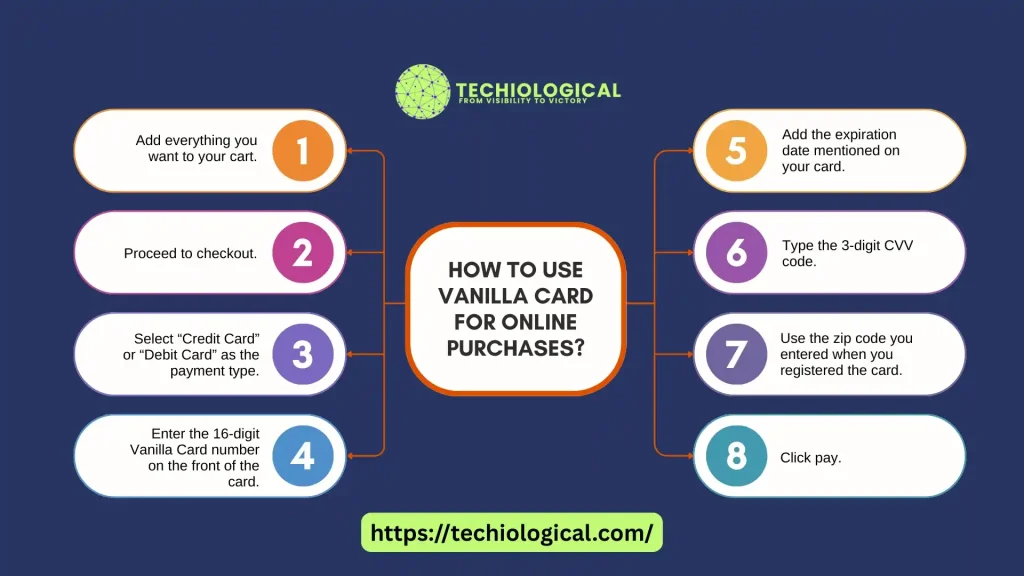
How to Use Vanilla Card for Online Purchases
Using the Vanilla card online is almost the same as using a regular credit or debit card:
Can You Use a Vanilla Card on Amazon?
Yes, absolutely! Thousands of people use them on Amazon every day. You can do it as well. Here’s the easiest way to use the card on Amazon:
Read Also: Find Top AI Decorating Apps
Common Reasons Your Vanilla Gift Card Is Not Working Online
Here are the top problems and quick fixes:
Problem |
Solution |
|---|---|
|
Card is not activated. |
Activate it on the official website. |
|
Card is not registered. |
Register with your name and zip code. |
|
Order is total higher than balance. |
Check the balance first or split the payment. |
|
Wrong billing zip code has entered. |
Use the zip code you registered with. |
|
Website asks for a PIN. |
Choose “Credit” (not Debit) – its a vanilla visa card don’t need a PIN online. |
|
Site blocks prepaid cards. |
Try a different store as most major sites accept them |
Are you still stuck in some problem? It’s advisable to call customer service. It gives you the best solution.
You can find the customer service number on the back of the card. They can see the problem you are facing on their system and can resolve it as soon as possible.
Pro Tips for The Best Experience
Conclusion
The gift card actually works like a prepaid card. These are available in two options: Vanilla Visa gift card or Vanilla Mastercard gift card. You can use this card without connecting your bank account details with it.
The buying process is very simple. You can buy it online or in-store as well. The activation process is also very easy and takes a few minutes.
The Vanilla prepaid gift card is the best choice to give as a Christmas gift, a new year gift, or a birthday surprise. It is a good option for children too. They can enjoy the prepaid card and no overspending. Therefore, no stress for the parents.